The First Agentic Legal Editor for Bulgarian Law
Every lawyer has been in this situation: you have a template, several attachments, a table of amounts, an old version of the document, and clarifications from the client. In the end, all of it has to become a clean, well-structured Word file. Meanwhile, you are checking facts, moving text between windows, and trying not to lose track of the latest version.
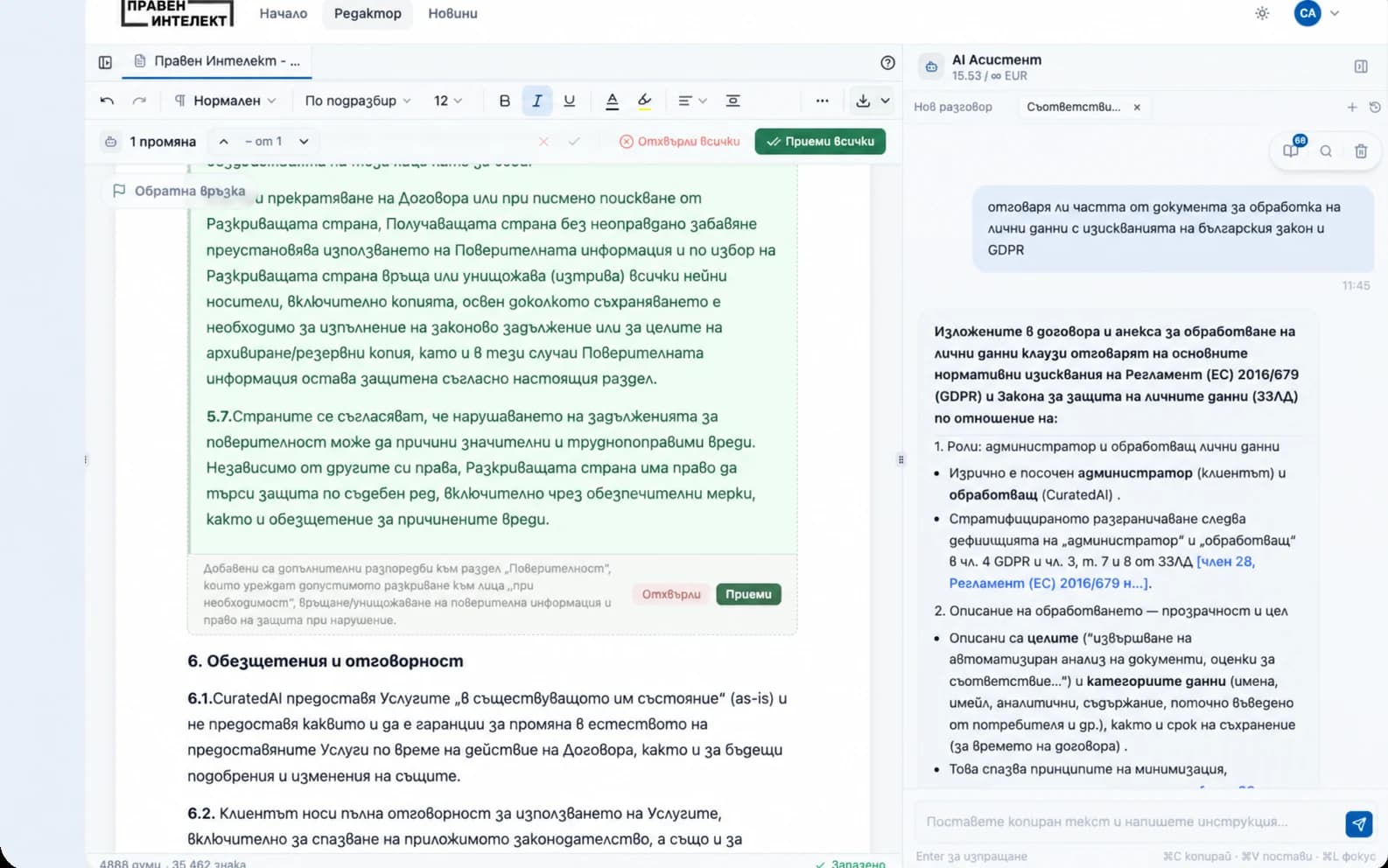
Praven Intelekt solves this problem with the first agentic legal editor for Bulgarian law. This is not just an AI chat sitting next to the document. The editor works inside the document itself, reads the case materials, proposes specific changes, keeps the link to sources, and finally lets you export to Word.
The goal is clear: less mechanical work around the document and more time for the legal judgement that remains in your hands.
Why this is different from a regular AI chat
With a regular AI chat, you describe the task, receive an answer, and then the manual transfer begins: copying into Word, reviewing the formatting, checking against the attachments, fixing omissions, and giving new instructions. The longer the document, the easier it is to lose context.
The legal editor works differently. It brings together:
- the document you are writing or editing;
- the template, if you are working from an approved structure;
- the case materials - PDFs, Word files, spreadsheets, and folders;
- the AI suggestions, which appear directly in the text;
- legal research, when the task requires checking Bulgarian legislation or case law;
- verifiable sources, when a statement is based on attached materials;
- Word export as a clean DOCX or a version with tracked changes.
This means AI is not a separate window from which you copy ready-made text. It is an agent working in the document environment and suggesting concrete next actions.
How the legal editor works
Everything starts with the document. You can open a blank document, upload a Word file for editing, or start from a template. Then you add context - the materials the agent should take into account for the specific case.
The context can include a contract, power of attorney, invoices, expert report, correspondence, table of amounts, or an entire folder of documents. This matters because Bulgarian law is not applied to abstract text, but to specific facts, deadlines, parties, and evidence.
After you give a task, the agent:
- reads the current text in the editor;
- takes your instruction into account;
- uses the attached case materials;
- when needed, conducts legal research in Bulgarian legislation and court decisions;
- proposes edits, additions, or cuts;
- shows the changes in a way that gives you control over every change.
This means that if the task requires a legal basis, the agent can search for the relevant statutory provisions or case law and use them in its proposal. The edit is therefore not based only on the attached files, but also on verifiable Bulgarian legal sources when necessary.
Example instructions:
-
"Fill in the section about the claim based on the contract, invoices, and table of amounts. If an amount is not confirmed by the materials, note it separately instead of including it in the text."
-
"Revise the 'Facts' section so that only the facts relevant to the claim remain. Do not change the dates, amounts, or prayer for relief."
-
"Check whether there is relevant case law on the limitation-period objection and suggest a short paragraph only if you find a reliable source."
Changes are not automatically saved as final text. They are shown as suggestions that you can accept, reject, or ask to be revised.
Step by step: working on a document
1. Choose how to start You can start from a blank document, upload a Word file, or choose a template. For recurring documents - motions, complaints, responses, contracts - the template helps preserve the structure.
2. Add context Attach the case materials using the button above the chat or with "@" in the message field. You can add a PDF, Word document, spreadsheet, or folder.
3. Give a specific task Describe what you want: a first draft, rewrite, shortening, added objection, amount check, or filling in data from the attachments.
4. Review the AI suggestions The editor shows the proposed changes in the text itself. This is key: you receive AI assistance without losing control over the document.
5. Check the sources When the text is based on attached materials, you can see which file an important statement comes from and compare it with the original. This is especially important for names, dates, amounts, deadlines, and quotes.
6. Export to Word After review, you can download a clean DOCX or, when the document was created from a file or template, a version with tracked changes. Before sending it, open the file in Word and check the formatting, tables, numbering, headers, and footers.
What you gain with the legal editor
The legal editor removes some of the slowest work around legal documents: moving between files, finding data in attachments, repeating edits, and manually organizing the text.
That means:
-
A faster first draft - especially for template-based documents.
-
Less manual copying between chat, Word, and attachments.
-
Clearer fact and source checking - because the case materials are part of the workflow.
-
More control - every important change is reviewed before it remains in the document.
-
An easier final review - with DOCX export to Word, including tracked changes when working from a source file or template.
The legal editor does not replace the lawyer. It removes the mechanical steps around the document so the lawyer can focus on legal strategy, argumentation, and checking the final text.